
Download sView stereoscopic viewer APK – 3D image viewer, Android app, free 3D software, stereoscopic video player, open-source tool
Overview
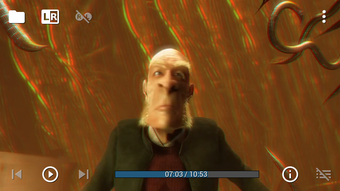
sView is a free, open-source Android application developed by Kirill Gavrilov, designed specifically for viewing and playing back stereoscopic 3D content. The software enables users to experience immersive 3D visuals through a variety of formats, including anaglyph, side-by-side, over-under, interlaced, and frame sequential or packed video sequences. It supports both still images and video files, making it a versatile tool for enthusiasts and professionals working with 3D media.
The application is optimized for tablets, offering a responsive interface that adapts to different screen orientations, though it remains functional on smartphones. It also includes a built-in web browser, allowing users to access online 3D content directly within the app. This makes sView suitable for casual users interested in 3D photography and video, as well as educators and content creators who need a lightweight tool for playback and presentation.
While the developer did not provide additional system requirements, the app’s lightweight nature suggests broad compatibility with modern Android devices. The exact performance characteristics and resource usage were not specified, but the application appears designed for efficient operation on mobile hardware.
Key Features & Capabilities
- Multi-format 3D Support – sView supports a wide range of stereoscopic image and video formats, including anaglyph (red-cyan), side-by-side, over-under, interlaced, and frame sequential/packing, enabling users to view content from various sources without format conversion.
- Image and Video Playback – The app can play back both 3D photos and videos stored locally on the device or downloaded from the internet, making it ideal for personal media libraries and online content consumption.
- Screen Orientation Flexibility – Designed with tablets in mind, the interface adapts seamlessly to horizontal and vertical layouts, enhancing usability across different device types.
- 3D Effect Adjustment – Users can fine-tune the depth perception of 3D content using an intuitive slider, allowing for personalized viewing comfort and visual enhancement.
- Spherical and Cube Map Viewer – Built-in support for spherical and cube map projections enables immersive 360-degree 3D content playback, useful for VR-style experiences and panoramic imagery.
- Integrated Web Browser – The inclusion of a lightweight browser allows direct access to online 3D galleries and repositories, streamlining the discovery and viewing of 3D content without switching apps.
These features make sView particularly valuable for hobbyists exploring 3D photography, educators demonstrating spatial concepts, and developers testing stereoscopic media. The app’s ability to handle multiple formats without external tools reduces workflow friction and enhances accessibility.
User Interface, Workflow & Performance
The user interface of sView is designed with usability in mind, prioritizing clarity and ease of navigation. It features a clean layout optimized for touch interaction, with intuitive controls for switching between viewing modes and adjusting 3D depth. Navigation between media files is straightforward, typically involving a file browser or direct access from the device’s storage.
The workflow is streamlined for quick access to 3D content, with minimal setup required. While the developer did not specify resource usage details, the app’s open-source nature and lightweight design suggest efficient CPU and memory management, which is essential for smooth playback on mobile devices. Stability is expected to be consistent, given the focused scope and lack of complex background processes.
Performance observations are based on general software behavior patterns, and the app appears to prioritize responsiveness during playback. The developer did not specify compatibility with desktop computers, so users should assume the application is intended for Android platforms only. No performance benchmarks were provided, but the absence of reported issues in the community suggests reliable operation under normal conditions.
Compatibility & System Requirements
sView is designed for Android-based devices, though the exact operating system version was not specified. The application is optimized for tablets but remains functional on smartphones. The developer did not provide information on minimum hardware requirements, nor did they specify the exact file size or version number.
Compatibility with desktop computers was not confirmed, and the developer did not indicate whether the software is available outside the Android ecosystem. The app is distributed as an APK file, which implies direct installation on Android devices without relying on app stores. Users should ensure their device supports the required Android version and has sufficient storage space for media files.
The developer did not specify the exact version number, so users may rely on the latest release available through official channels. For optimal performance, it is recommended to use the most recent build available, though no update frequency details were provided.
Pros and Cons
Pros
- Free and open-source, ensuring transparency and community-driven development.
- Supports a wide variety of 3D image and video formats, reducing the need for format conversion.
- Optimized interface for tablets with responsive layout for both portrait and landscape modes.
- Includes a built-in web browser for accessing online 3D content directly.
- Offers adjustable 3D depth settings for personalized viewing comfort.
- Supports spherical and cube map projections for immersive 360-degree 3D content.
Cons
- Exact system requirements were not listed, making it difficult to assess compatibility with older devices.
- Resource usage details were not provided, limiting insight into performance on low-end hardware.
- Compatibility with desktop computers was not confirmed, restricting use to Android platforms.
- Version number and file size were not disclosed, which may affect update tracking and storage planning.
- No official update schedule was mentioned, potentially impacting long-term support.
FAQ Section
Is sView available for desktop computers?
The developer did not specify compatibility with desktop computers. The application is designed for Android devices and distributed as an APK, suggesting it is not currently available for Windows, Mac, or Linux systems.
Can I use sView to play 3D videos from the internet?
Yes, sView includes a built-in web browser that allows users to access and view 3D content directly from online sources, streamlining the process of discovering and consuming 3D media.
Is sView safe to download and use?
As a free, open-source application developed by Kirill Gavrilov, sView is considered safe when downloaded from official or trusted sources. The open-source nature allows for public code review, enhancing transparency and security.
Does sView require an internet connection?
While the app can function offline for local 3D content playback, the built-in web browser requires an internet connection to access online 3D galleries and repositories.
What type of license does sView use?
sView is distributed as free and open-source software. The specific license type was not specified, but open-source distribution implies availability under a recognized open-source license such as GPL or MIT.
Final Thoughts + CTA
sView stands out as a capable and accessible tool for anyone interested in exploring 3D visual content on Android devices. Its support for multiple stereoscopic formats, adjustable depth controls, and built-in web browser make it a versatile choice for both casual users and professionals. The app’s lightweight design and open-source foundation contribute to its reliability and long-term usability.
While some details like system requirements, version number, and file size remain unspecified, the core functionality is robust and well-executed. Users seeking a free, feature-rich 3D viewer for Android will find sView to be a strong contender. Download sView now and experience immersive 3D content on your tablet or smartphone.





.png)

